
Fast checkout without losing the current sale
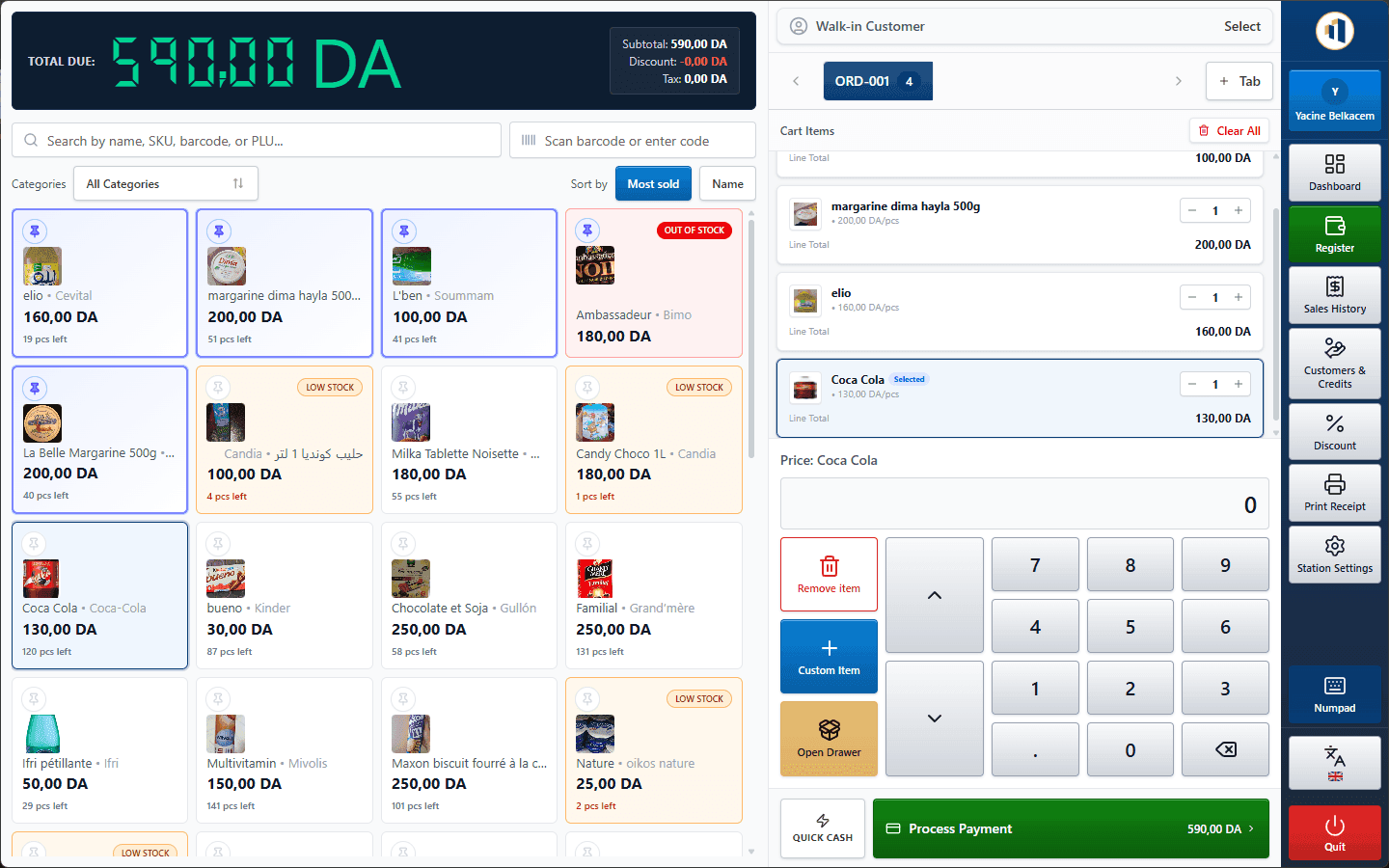
Add products by barcode, name, SKU, PLU or quick pick. Keep several tickets open and move between customers without rebuilding a cart.
- Keyboard shortcuts
- Quantity price tiers
- Auto-print receipts
Makhazeen is Windows inventory management and point-of-sale software for grocery stores, phone shops, retailers and wholesalers. Scan, sell, track customer credit and see your margins, even when the internet is down.
For retailers and wholesalers that need accurate stock
Barcode scanning, weighed products, quick picks and the customer carnet.
Barcode and SKU tracking, invoices, supplier balances and stock by warehouse.
Cosmetics, clothing, hardware and stationery: categories, brands, discounts and reports.
Quantity price tiers, delivery notes, customer credit and multiple warehouses.
A completed sale updates stock, payments, customer balances and reports without duplicate entry.
Add products by barcode, name, SKU, PLU or quick pick. Keep several tickets open and move between customers without rebuilding a cart.
Sales, purchases, returns, transfers and adjustments create stock movements, giving you both the current quantity and the history behind it.
Reconcile each register shift, maintain a ledger for customer credit, and review revenue, margin and tax for the period you choose.
Sales, stock, purchasing, customer balances and reports use the same data, so staff do not have to enter the same transaction twice.
Scan, search or tap a quick pick. Keep several tickets open and get the queue moving.
Learn moreProducts, categories, brands, units, tax rates, price tiers and kits, all in one catalogue.
Learn moreKnow what is on the shelf and in the back room, and how every quantity changed.
Learn moreOrder, receive and pay suppliers, and always know what you still owe.
Learn moreThe credit notebook, digitised. See who owes what and collect payments later.
Learn moreRoles, permissions, manager approval and register shifts for accountable daily operation.
Learn moreInvoices, delivery notes and credit notes generated from your sales.
Learn moreSales, profit, TVA, staff and stock reports, plus an Excel export for your accountant.
Learn moreYour data lives in your shop. Keep selling when the internet drops, with several tills on one network.
Learn moreThe business database is stored on the main PC. Other authorised stations connect over the local network, so checkout, stock and reporting remain available when the internet is down.
Internet (optional)
Optional cloud backup & sync
Main PC (server)
Holds the database. Sells like any other till.
Till 2
Till 3
Back office
Internet cut? Every till keeps selling. Only the optional online services wait.
Main PC off? Other tills can't reach the database. Keep the main PC on during opening hours.
Cashiers work quickly, managers investigate exceptions, buyers replenish stock and accountants export period figures.
Serve the queue quickly
Know what sold and what remains
Keep the shelves supplied
Prepare period figures
Makhazeen supports customer credit, Algerian stamp duty, quantity-based wholesale pricing and Arabic, French and English throughout the application.
Local support from the team that builds the software, in Arabic, French or English.
Prices, payments, change, balances and reports are recorded and displayed in dinars.
Configurable stamp duty at checkout and on documents, with tax breakdowns per rate.
Credit sales, partial payments and later collections, with a clear ledger per customer.
Each employee works in their language, with a full right-to-left Arabic interface.
The application is available in French, Arabic (with full right-to-left layout) and English. Each user can choose their language. Amounts are in Algerian dinars (DZD).
Yes. One PC acts as the server and holds the database; the other stations connect to it over your shop's local network (LAN) and share the same products, stock and customers.
Yes. Selling, stock, customers, purchases and reports all run on your local PC and network. Internet is only needed for update checks and the optional cloud backup & sync — licence activation can be done online or fully offline. Note that additional tills need to reach the main PC over the local network.
Pricing depends on the modules you need (register shifts, automatic purchase orders, multiple warehouses, cloud sync) and the number of stations. Contact us for a quote tailored to your shop.
Tell us how many stations and stock locations you use. We will prepare a clear licence quote, or demonstrate the relevant workflows first.